

By now, you’ve probably heard of ChatGPT. Maybe you’ve used it. Maybe you’re still using it. But there’s another AI tool quietly earning a reputation among marketers and business owners who need something a little more… precise.
It’s called Claude, and it’s made by a company called Anthropic.
Inside Ad Traffic School™, we talk a lot about building traffic systems that actually convert and AI tools are becoming a bigger part of that conversation. Not because AI runs your ads for you (it doesn’t), but because pairing a sharp AI assistant with a real paid traffic strategy is where things start to get interesting. Claude is the tool I keep coming back to.
I’ve been putting it through its paces, and I wanted to give you an honest, practical breakdown of what Claude AI for marketing actually looks like — no hype, just what it can (and can’t) do for your business.
Let’s dig in.
Claude AI: What Even Is It?
Claude is a conversational AI assistant built by Anthropic, an AI safety company founded in 2021 by former OpenAI researchers, including Dario and Daniela Amodei. If ChatGPT is the loud overachiever everyone’s talking about at the party, Claude is the one in the corner who actually reads the room.
It’s a large language model (LLM), which means it was trained on massive amounts of text data and can hold natural, multi-turn conversations, answer questions, write content, analyze documents, and help you think through complex problems.
Where Claude stands out is in its ability to handle long, nuanced prompts and maintain context over a lengthy conversation. You can hand it a 50-page document and ask it to summarize the key points, find inconsistencies, or rewrite sections in your brand voice. That alone is a game-changer for business owners drowning in content.
What It’s NOT
Claude is not a replacement for strategy. It doesn’t know your audience, your offer, or your numbers. You still have to bring that.
It’s also not infallible. Like any AI, it can confidently say something that isn’t accurate. Always gut-check outputs before hitting publish or sending to a client.
And just like with ChatGPT, if you give it a vague prompt, you’ll get a vague answer. Garbage in, garbage out. The quality of what you get back is directly tied to how well you craft your request.
Claude vs. ChatGPT: Is There a Difference?
Yes, and it matters depending on what you’re using it for.
ChatGPT (by OpenAI) is the most widely known AI assistant and has a massive plugin and integration ecosystem. It’s powerful and versatile.
Claude tends to shine when you need:
- Longer context windows — Claude can read and work with significantly more text at once, making it ideal for reviewing contracts, long-form copy, or multi-page strategies
- More nuanced writing — Many users find Claude’s writing feels less robotic and more natural right out of the gate
- Analytical tasks — Breaking down a funnel, reviewing ad copy for logical gaps, identifying weak spots in a launch strategy
Neither tool is universally “better.” They’re different instruments. Knowing when to use which one is the real skill.
How To Use Claude AI For Marketing In Your Business
Here’s where it gets practical. These are real use cases, not theoretical ones.
Campaign Strategy & Brainstorming
Stuck on your next campaign angle? Drop in your offer details, your audience pain points, and your current results, and ask Claude to generate five different positioning angles. It won’t replace your strategic thinking — but it will give you something to react to, which is often the hardest part of starting.
Long-Form Content Creation
Blog posts, email sequences, sales page drafts — Claude handles long-form writing well. Give it a detailed brief (audience, tone, goal, key points to hit) and you’ll get a solid first draft you can edit rather than staring at a blank page.
Ad Copy Variations
Need five versions of a headline for a Meta ad? Ten variations of a lead hook for a Google responsive search ad? Claude can generate a range of options fast. Feed it your best-performing copy as a reference point and ask it to riff from there.
Reviewing and Refining Your Own Copy
This is underrated. Paste in your sales page, your email, your ad copy and ask Claude to identify what’s unclear, what’s missing, or where the reader might drop off. It’s like having an editor on call.
Market Research & Audience Insights
Ask Claude to roleplay as your ideal client and respond to your offer. Ask it what objections they’d have. What questions they’d Google before buying. What would make them trust you or not. You won’t get real data but you’ll get a useful thinking framework.
SOPs and Internal Documentation
This one flies under the radar, but it saves hours. Use Claude to help you build out onboarding docs, process write-ups, or client-facing guides. Give it the rough version and ask it to clean it up and structure it clearly.
Claude Has Gotten a Lot More Powerful — Here’s What’s New
When I first started using Claude, it was primarily a chat interface — you’d type a prompt, get a response, and do something with it. That’s still true, but Claude has expanded well beyond that model. There are now several ways to work with it depending on what kind of work you’re doing, and if you haven’t looked beyond the basic chat interface lately, you’re leaving a lot on the table.
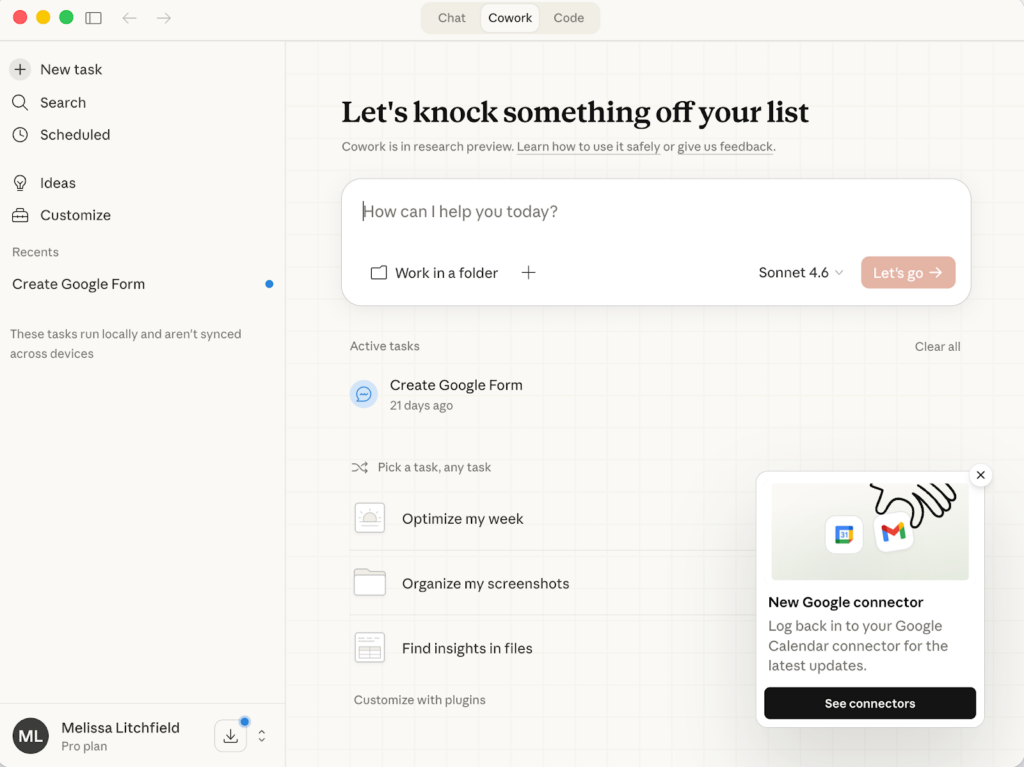
Claude Cowork: For Non-Developers Who Want to Automate
If you’ve ever looked at a pile of repetitive tasks — renaming files, organizing folders, sorting through documents — and thought there has to be a better way, Claude Cowork is worth knowing about. It’s a desktop tool designed for people who are not developers and don’t want to write code, but still want to automate file and task management.
Think of it as giving Claude access to your desktop environment so it can actually do things, not just tell you how to do them. For business owners managing a lot of content, client files, or internal documentation, this is the kind of tool that quietly saves hours without requiring a technical background to use.
Claude Code: For Technical Projects and Builds
Claude Code is a command-line tool built for agentic coding — meaning it doesn’t just write code snippets for you, it can execute tasks, write files, debug, and work through a codebase with real context over time.
I’ve been using it directly in the development of MILA, my SaaS product that integrates video with deadline funnels. Having an AI that can hold the full context of a technical project, write and run code, and work through multi-step problems has significantly changed how fast I can move on the build. If you’re working on anything technical — a custom tool, an internal system, a more complex automation — Claude Code is worth understanding.
It’s also available as an extension inside VS Code and JetBrains if you prefer working inside your IDE.
Claude Connectors: Plugging Into Your Existing Tools
One of the more practical developments in the Claude ecosystem is the expansion of connectors — integrations that let Claude plug directly into tools you’re already using. We’re talking Google Drive, Gmail, Google Calendar, Asana, Canva, Slack, and more, with the list continuing to grow.
What this means in practice: instead of copying and pasting content between platforms, you can ask Claude to pull from a document in your Drive, reference your calendar, or create a task in your project management tool — all inside a single conversation. For marketers and agency owners juggling a lot of moving pieces across a lot of platforms, this starts to feel less like using a chat tool and more like working with an assistant who actually has access to your systems.
If you haven’t explored what connectors are available in your Claude settings, it’s worth five minutes to take a look. The practical use cases stack up fast.
Claude AI For Marketing: Now What?
If you haven’t played with Claude yet, go create a free account at claude.ai and give it a real task — not a toy one. Paste in a piece of copy you’re not happy with and ask it to tell you what’s wrong with it. You might be surprised.
The marketers and business owners who are going to win with AI aren’t the ones who handed it the wheel. They’re the ones who learned how to direct it.
That’s the skill worth building.
Ready to build traffic systems that actually work? Join Ad Traffic School™, the membership community for digital marketers and online business owners who are serious about paid traffic.